

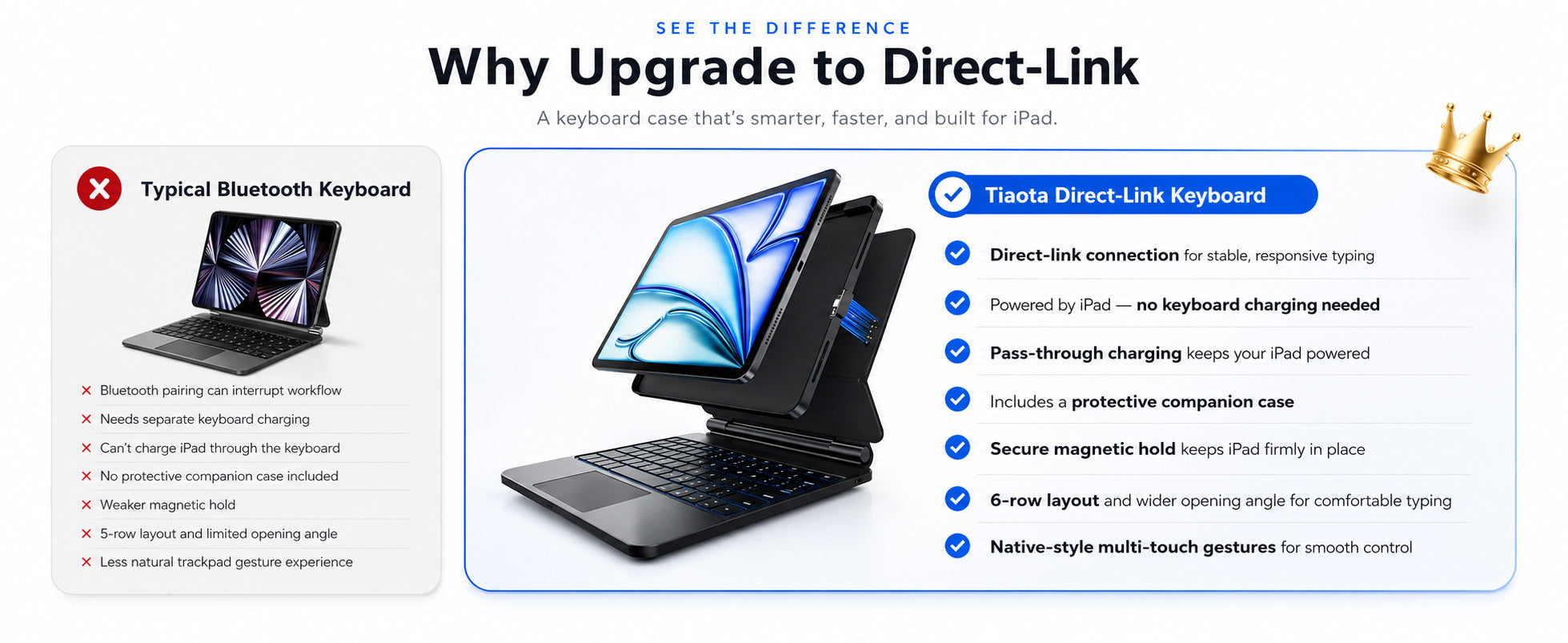
When choosing an iPad keyboard case, one of the biggest questions is connection type: should you choose a Bluetooth keyboard case or a direct-link keyboard case?
Both options can help you type more comfortably on your iPad, but they do not offer the same daily experience. If you use your iPad for work, study, meetings, travel, or multitasking, the difference can matter more than you think.
A Bluetooth keyboard case is familiar and widely used. A direct-link iPad keyboard case, however, is designed to make the setup simpler by removing Bluetooth pairing and separate keyboard charging from your routine.
If you are also comparing magnetic keyboard-style setups, you can read our related guide: Best Magic Keyboard Alternative for iPad.
What Is a Bluetooth iPad Keyboard Case?
A Bluetooth iPad keyboard case connects to your iPad wirelessly through Bluetooth. After pairing the keyboard with your iPad, you can type without using the on-screen keyboard.
This type of keyboard case is common and useful for many basic typing needs. However, it usually needs its own battery, which means you may need to charge the keyboard separately and reconnect it when needed.
For casual typing, a Bluetooth keyboard case can be enough. But for users who want a faster and cleaner setup, the extra steps may feel inconvenient over time.
What Is a Direct-Link iPad Keyboard Case?
A direct-link iPad keyboard case connects directly when your iPad is attached to the keyboard. Instead of pairing through Bluetooth, the keyboard is ready to use once connected.
This makes the experience feel more immediate. You do not need to open Bluetooth settings, wait for pairing, or worry about whether the keyboard battery is low.
For users who want an iPad keyboard case without Bluetooth, direct-link typing offers a more plug-and-play workflow.
Direct Link vs Bluetooth: Quick Comparison
If you are comparing both options, the main difference is not only how they connect. It is also how they affect your daily workflow.
| Feature | Direct-Link Keyboard Case | Bluetooth Keyboard Case |
|---|---|---|
| Connection | Attach and type | Requires Bluetooth pairing |
| Setup steps | Simple and immediate | May need pairing or reconnecting |
| Keyboard charging | No separate keyboard charging | Usually needs separate charging |
| Battery management | Less to monitor | Keyboard battery needs attention |
| Best for | Work, study, meetings, travel | Casual typing and basic use |
Why Direct Link Feels Easier for Daily Work
Small interruptions can break your workflow. A keyboard that needs pairing, reconnecting, or charging may not seem like a big problem at first, but it can become frustrating when you use your iPad every day.
A direct-link keyboard case helps reduce these interruptions. Once your iPad is attached, the keyboard is ready to type. This is especially useful when you are moving between classes, meetings, cafés, airports, or different workspaces.
- No Bluetooth pairing before typing
- No separate keyboard charging routine
- Fewer connection interruptions
- Cleaner setup with fewer cables
- More focus on work, study, and productivity
Which One Is Better for Typing?
Both direct-link and Bluetooth keyboard cases can improve typing compared with the on-screen keyboard. The real difference is how quickly you can start and how stable the experience feels during daily use.
If you only type occasionally, a Bluetooth keyboard case may be enough. But if you write emails, take notes, edit documents, manage tasks, or use your iPad for longer work sessions, direct-link typing can feel more dependable.
The fewer steps you need before typing, the easier it is to stay focused.
Which One Is Better for Travel?
For travel, a direct-link keyboard case has a clear advantage: less charging to manage.
When you are carrying your iPad between home, school, the office, cafés, hotels, or airports, every extra cable and battery level can become one more thing to think about.
A no charging iPad keyboard case helps simplify your bag and your routine. You can focus more on your schedule and less on whether your keyboard is ready.
Which One Is Better for a Laptop-Like Setup?
If you want your iPad to feel closer to a compact laptop, look for more than just a keyboard. Trackpad control, magnetic support, viewing angle, and charging design all matter.
The TIAOTA Direct Link Keyboard Case is designed with a magnetic structure, floating-angle support, trackpad navigation, pass-through charging, backlit keys, and daily protection. These features help create a cleaner and more complete iPad workspace.
An iPad keyboard case with trackpad is especially helpful if you use your iPad for multitasking, browsing, writing, online classes, or work documents.
For a broader buying guide around magnetic keyboard-style setups, check our article: Best Magic Keyboard Alternative for iPad.
Who Should Choose a Bluetooth Keyboard Case?
A Bluetooth keyboard case can still be a good option for users who only need basic typing from time to time.
It may be enough if you:
- Use your iPad mainly for casual browsing
- Only type short messages or simple notes
- Do not mind charging the keyboard separately
- Are comfortable managing Bluetooth pairing
For light use, Bluetooth can be practical and familiar.
Who Should Choose a Direct-Link Keyboard Case?
A direct-link keyboard case is better for users who want a more efficient and reliable everyday setup.
It is a strong choice if you:
- Use your iPad for work or study every day
- Want to avoid Bluetooth pairing
- Do not want to charge the keyboard separately
- Need a keyboard and trackpad for multitasking
- Want a cleaner Magic Keyboard-style experience
- Move between different locations often
If your iPad is part of your daily workflow, direct link can make the experience feel smoother and more dependable.
Final Thoughts
When comparing a direct-link vs Bluetooth iPad keyboard case, the better choice depends on how you use your iPad.
If you only need basic typing, a Bluetooth keyboard case may be enough. But if you want a cleaner setup with no Bluetooth pairing, no separate keyboard charging, trackpad control, magnetic support, and a more laptop-like experience, a direct-link keyboard case is the stronger option.
The TIAOTA Direct Link Keyboard Case is made for users who want their iPad to feel ready for work, study, travel, and everyday productivity.
Want to compare this with a Magic Keyboard-style setup? Read our guide: Best Magic Keyboard Alternative for iPad.
Share:
Best Magic Keyboard Alternative for iPad
Adjustable iPad Keyboard Case for Work, Study, and Creative Setups