
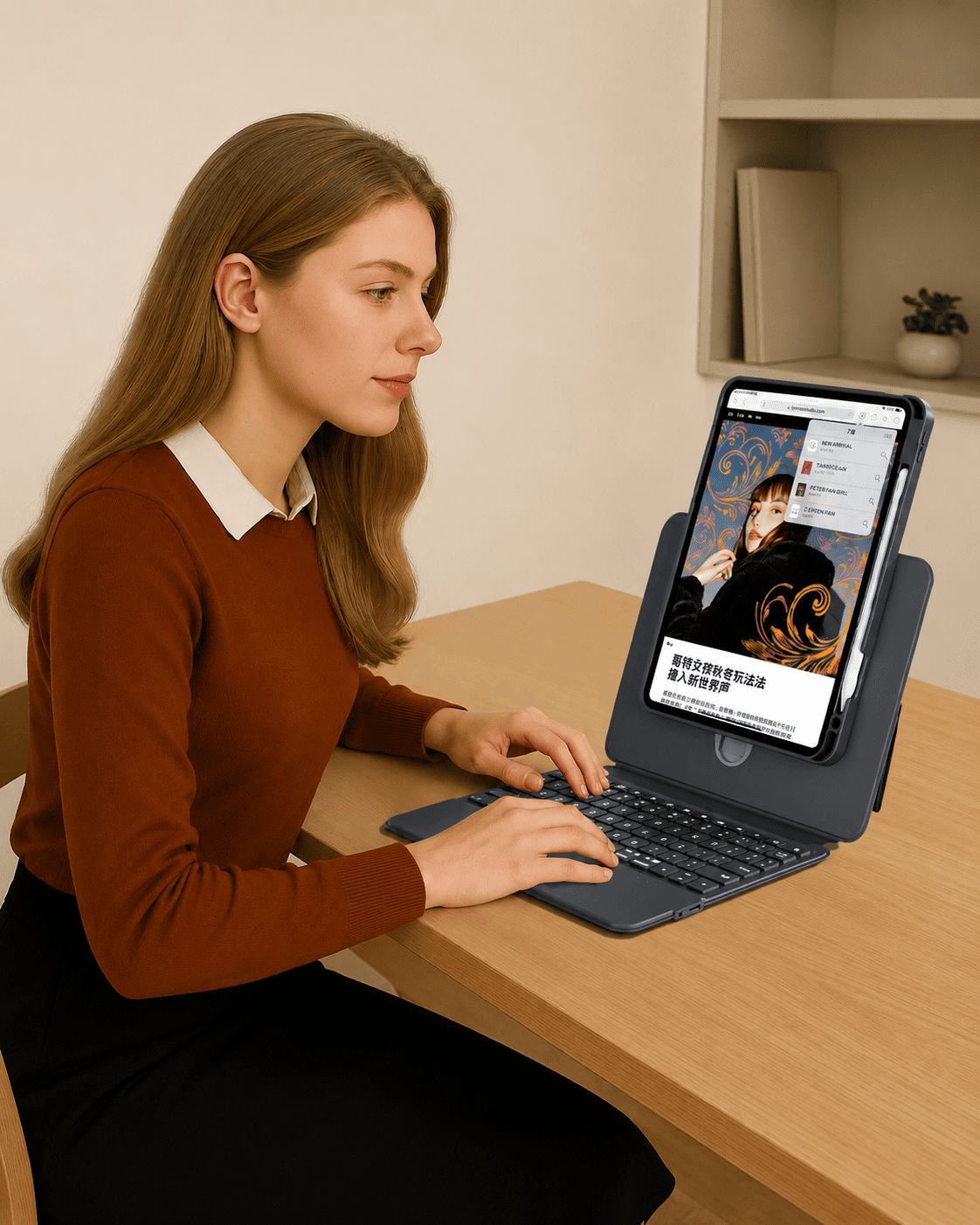

Your iPad is made for more than one task. You may use it for typing, reading, studying, drawing, video calls, browsing, presentations, or watching content. That is why a basic keyboard case is not always enough.
If you want more flexibility from your daily setup, an adjustable iPad keyboard case can make your iPad feel more comfortable, more versatile, and more useful throughout the day.
The TIAOTA Sliding Rail iPad Keyboard Case is designed for users who need more than a fixed typing angle. With a sliding rail lift, 360° rotation, magnetic detachable design, responsive trackpad, backlit keys, and protective case structure, it helps your iPad adapt to work, study, creativity, and everyday use.
Why Choose an Adjustable iPad Keyboard Case?
Many iPad keyboard cases are built around one main position: open the case, type, close it. That can work for simple tasks, but real daily use often needs more flexibility.
You may want a higher screen position for video calls, a portrait view for reading, a landscape view for typing, or a detachable setup for drawing and browsing. An adjustable keyboard case gives you more ways to use your iPad without constantly changing accessories.
This makes it especially useful for:
- Work and remote productivity
- Online classes and study sessions
- Creative planning and drawing
- Video calls and presentations
- Reading, browsing, and entertainment
Sliding Rail Lift for a Better Viewing Angle
One of the most important features of the Sliding Rail Keyboard Case is its elevated viewing design. Instead of keeping your iPad low on the desk, the sliding rail helps raise the screen to a more comfortable height.
This can make a difference during long work sessions, online meetings, reading, or typing. A higher viewing position helps your setup feel more natural and reduces the need to keep looking down at the screen.
If you often use your iPad like a small laptop, a sliding rail iPad keyboard case gives you a more ergonomic way to work.
360° Rotation for Portrait and Landscape Use
Not every task works best in landscape mode. Sometimes portrait mode is better for reading documents, browsing long pages, checking notes, or reviewing content.
With 360° rotation, the Sliding Rail Keyboard Case lets you switch between portrait and landscape views more easily. This gives your iPad more flexibility for different tasks and different environments.
| Mode | Best For |
|---|---|
| Landscape mode | Typing, video calls, presentations, watching videos |
| Portrait mode | Reading, browsing, note review, document checking |
| Elevated view | Work, meetings, study, long desk sessions |
| Detached use | Drawing, tablet mode, relaxed browsing, entertainment |
Magnetic Detachable Design for More Flexibility
A keyboard is useful when you need to type, but you may not want to keep your iPad attached to the keyboard all the time. That is where magnetic detachable design becomes important.
The Sliding Rail Keyboard Case lets you switch more easily between laptop-style typing and tablet-style use. You can type when you need productivity, then detach when you want a lighter setup for reading, drawing, or watching content.
This makes the case more flexible for users who move between work, creativity, and entertainment throughout the day.
Trackpad Control for a Laptop-Like Experience
An iPad keyboard case with trackpad can make your iPad feel much closer to a compact laptop setup.
Instead of reaching for the screen every few seconds, you can scroll, tap, select, switch apps, and navigate iPadOS more naturally. This is useful for writing, researching, managing tabs, taking online classes, joining meetings, and handling daily tasks.
When combined with an adjustable screen position, the trackpad helps create a smoother and more comfortable workspace.
Backlit Keys for Work in Different Environments
Backlit keys are helpful when you work or study in different lighting conditions. Whether you are typing at night, working in a café, studying in a dorm, or using your iPad while traveling, keyboard lighting can make typing easier.
The Sliding Rail Keyboard Case includes 7-color RGB backlighting with adjustable brightness, giving your setup both practical visibility and a more personalized look.
Best For Work, Study, Creativity, and Everyday Use
The biggest advantage of an adjustable iPad keyboard case is that it supports more than one routine. It is not only for typing. It is also for switching between different ways of using your iPad.
| User Scenario | How the Sliding Rail Case Helps |
|---|---|
| Work | Elevated viewing, keyboard input, and trackpad control support daily productivity. |
| Study | Typing, reading, note review, and online classes feel more organized. |
| Creative use | Flexible angles and detachable use make drawing, planning, and content review easier. |
| Meetings | The raised screen position helps with video calls and presentations. |
| Entertainment | Rotation and adjustable viewing make browsing and watching more comfortable. |
Sliding Rail vs Direct Link: Which One Should You Choose?
The Sliding Rail Keyboard Case and Direct Link Keyboard Case are made for different needs.
If you want the simplest connection experience with no Bluetooth pairing and no separate keyboard charging, the Direct Link Keyboard Case may be a better fit.
If you care more about adjustable height, 360° rotation, portrait and landscape viewing, and flexible multi-angle use, the Sliding Rail Keyboard Case is the stronger choice.
| Feature | Sliding Rail Keyboard Case | Direct Link Keyboard Case |
|---|---|---|
| Main advantage | Adjustable height and 360° rotation | No Bluetooth pairing and no separate keyboard charging |
| Best for | Flexible work, study, drawing, viewing, presentations | Fast typing, office work, meetings, travel productivity |
| Viewing flexibility | Portrait, landscape, elevated view, detachable use | Magnetic floating-angle setup |
| Connection style | Bluetooth keyboard connection | Direct-link typing |
You can also read our comparison guide: Direct Link vs Bluetooth iPad Keyboard Case.
Who Should Choose the Sliding Rail iPad Keyboard Case?
The Sliding Rail Keyboard Case is a strong fit for users who want an iPad setup that can change with their day.
For Professionals
If you use your iPad for work, meetings, documents, emails, and presentations, the elevated viewing and trackpad control can help create a more comfortable mobile workspace.
For Students
If you use your iPad for notes, online classes, assignments, and reading, the adjustable viewing modes can make study sessions more flexible.
For Creators
If your iPad is part of your creative routine, the detachable and rotating design can support sketching, planning, reviewing, and editing from different angles.
For Everyday Users
If you want one case for typing, browsing, watching, and casual use, the Sliding Rail design gives your iPad more ways to fit your routine.
Final Thoughts
If you are looking for an adjustable iPad keyboard case that supports more than typing, the TIAOTA Sliding Rail iPad Keyboard Case is made for flexible everyday use.
With sliding rail lift, 360° rotation, magnetic detachable design, trackpad control, backlit keys, and daily protection, it helps your iPad adapt to work, study, creativity, meetings, and entertainment.
Instead of forcing your iPad into one fixed position, it gives you more ways to work, create, and relax.
Share:
Direct Link vs Bluetooth iPad Keyboard Case
Sliding Rail vs Direct Link iPad Keyboard Case