

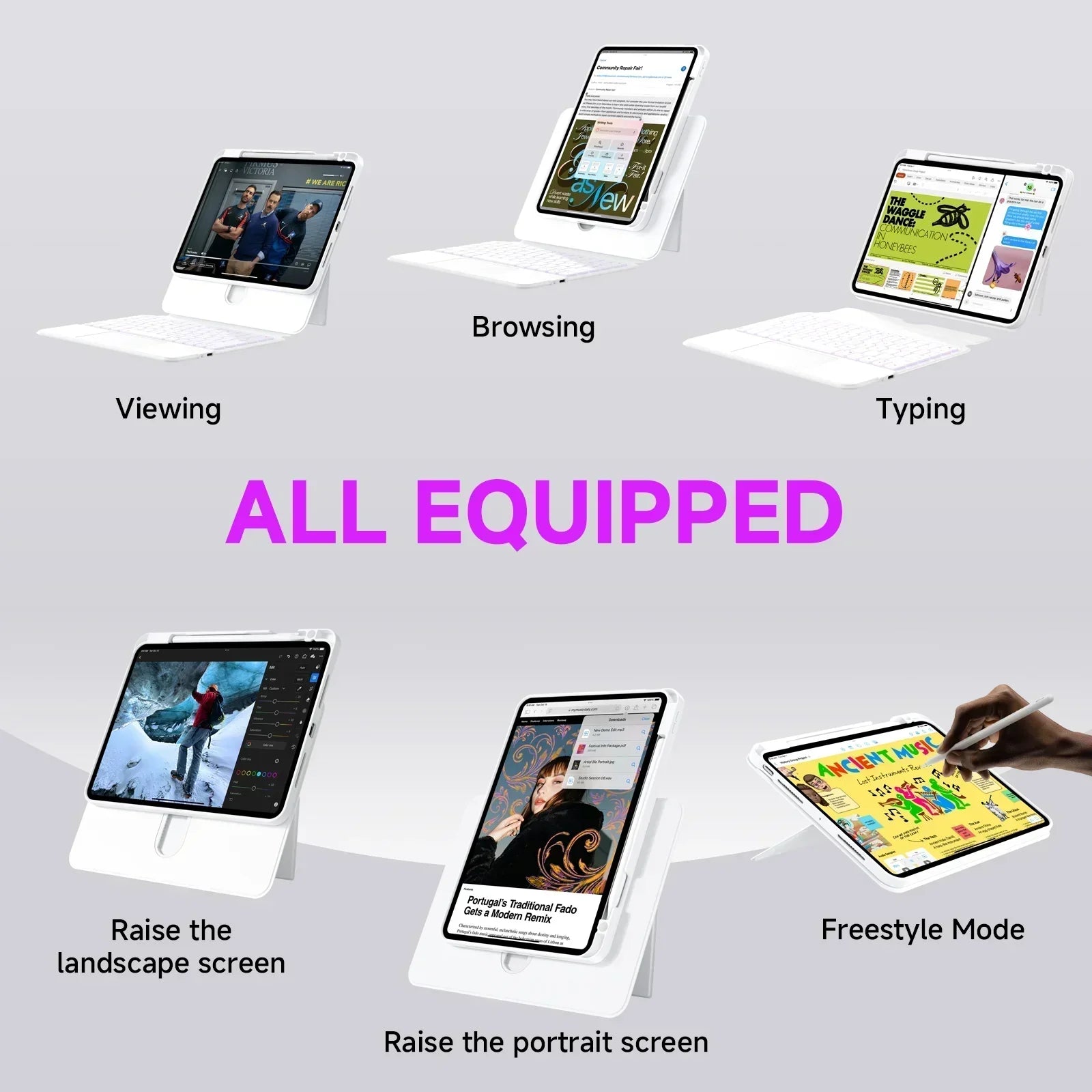
If you use an iPad Air 11 or iPad Pro 11, choosing the right keyboard case can make your iPad feel much more useful for work, study, travel, and everyday tasks.
A good iPad Air 11 keyboard case or iPad Pro 11 keyboard case should do more than protect your device. It should also make typing easier, improve navigation, support comfortable viewing angles, and fit the way you actually use your iPad every day.
At TIAOTA, different keyboard case styles are designed for different users. Some focus on direct-link productivity. Some focus on adjustable viewing and 360° rotation. Others focus on transparent design, aesthetic setups, and flexible daily use.
This guide will help you compare the main options and choose the best iPad keyboard case for your setup.
First: Check Your Exact iPad Model
Before choosing any keyboard case, the most important step is to confirm your exact iPad model and size.
Even if two iPads look similar, the case fit may be different. Camera position, body size, connector position, and magnetic alignment can all affect compatibility.
For iPad Air 11 and iPad Pro 11 users, always check the product model option before purchase. Choose the exact version that matches your iPad, such as iPad Air 11, iPad Pro 11, iPad Air 4/5, or other listed compatible versions.
If you are unsure, check the model number in your iPad settings before placing an order.
What to Look for in an iPad Air 11 or iPad Pro 11 Keyboard Case
The best keyboard case depends on how you use your iPad. A student may need comfortable typing and easy note-taking. A professional may care more about trackpad control and a clean workflow. A creator may need rotation, detachable use, and flexible viewing angles.
| Feature | Why It Matters |
|---|---|
| Exact compatibility | The case should match your iPad Air 11 or iPad Pro 11 model. |
| Keyboard comfort | Comfortable typing helps with notes, emails, documents, and daily work. |
| Trackpad support | A trackpad makes the iPad feel more laptop-like for navigation and multitasking. |
| Connection type | Direct-link and Bluetooth keyboard cases offer different daily experiences. |
| Viewing flexibility | Adjustable angles help with typing, reading, video calls, drawing, and watching. |
| Protection | A good case should help protect your iPad during carrying and daily use. |
| Design style | Your keyboard case should match your workspace, lifestyle, and personal taste. |
Best for No Bluetooth and No Charging: Direct Link Keyboard Case
If you want the cleanest productivity setup, the TIAOTA Direct Link Keyboard Case is a strong choice.
This style is designed for users who do not want to deal with Bluetooth pairing or separate keyboard charging. Once your iPad is attached, the keyboard is ready to use. This makes it a practical option for work, meetings, study, commuting, and travel.
It is especially suitable if you want:
- No Bluetooth pairing before typing
- No separate keyboard charging routine
- A magnetic keyboard setup
- Trackpad control for laptop-like navigation
- Pass-through charging for a cleaner workflow
- A slim setup for daily productivity
If you are comparing connection types, you can also read our guide: Direct Link vs Bluetooth iPad Keyboard Case.
Best for Adjustable Viewing: Sliding Rail iPad Keyboard Case
If you want more flexible viewing angles, the TIAOTA Sliding Rail iPad Keyboard Case may be the better fit.
This keyboard case is designed for users who do more than type. With adjustable height, 360° rotation, magnetic detachable use, trackpad control, and backlit keys, it helps your iPad adapt to different tasks throughout the day.
It is especially useful for:
- Typing at a more comfortable viewing height
- Switching between portrait and landscape mode
- Video calls and presentations
- Reading documents or browsing long pages
- Drawing, planning, and creative review
- Relaxed watching and entertainment
If you want a deeper guide, read: Adjustable iPad Keyboard Case for Work, Study, and Creative Setups.
Best for Aesthetic Setups: Transparent iPad Keyboard Case
If you care about both productivity and desk setup style, a transparent iPad keyboard case can make your iPad setup feel more personal.
The transparent design gives your device a more distinctive look while still supporting daily typing, trackpad navigation, rotation, backlit keys, and protective use.
This style is a strong fit for users who want:
- A cleaner and more visual iPad setup
- Transparent or Y2K-style design
- Color options that match personal style
- Keyboard and trackpad functionality
- Flexible daily use for work, study, and entertainment
If your workspace is part of your personal style, this type of keyboard case can make your iPad feel less generic and more expressive.
Which TIAOTA Keyboard Case Should You Choose?
Each keyboard case style is designed for a different type of user. The best choice depends on your daily routine.
| User Need | Recommended Style | Why |
|---|---|---|
| No Bluetooth, no separate keyboard charging | Direct Link Keyboard Case | Best for a simpler plug-and-play workflow. |
| Adjustable height and 360° rotation | Sliding Rail Keyboard Case | Best for flexible viewing, study, meetings, and creative use. |
| Transparent design and aesthetic setup | Transparent Keyboard Case | Best for users who want productivity with personal style. |
| Trackpad navigation | Direct Link, Sliding Rail, or Transparent Series | Best for laptop-like iPad control and multitasking. |
| Work and travel productivity | Direct Link Keyboard Case | Best for fewer setup steps and less charging to manage. |
| Drawing, reading, and presentations | Sliding Rail Keyboard Case | Best for multiple viewing modes and detachable use. |
For Students
If you use your iPad Air 11 or iPad Pro 11 for classes, notes, assignments, online lessons, or research, look for a keyboard case with comfortable typing and trackpad support.
The Sliding Rail style is a strong option if you switch between typing notes, reading documents, and watching classes. The Direct Link style is better if you want fewer connection steps and no separate keyboard charging.
For Professionals
If your iPad is part of your work routine, the Direct Link Keyboard Case is especially practical. It helps reduce setup friction, making it easier to start typing, join meetings, write documents, and manage daily tasks.
For longer desk sessions or frequent video calls, the Sliding Rail design can also be useful because of its elevated viewing and adjustable angles.
For Creators
If you use your iPad for writing, sketching, planning, editing, content review, or creative organization, flexibility matters.
The Sliding Rail Keyboard Case gives you more options for portrait view, landscape view, elevated viewing, and detachable use. The Transparent Series is also a strong choice if your creative setup depends on visual style and personal expression.
For Everyday iPad Users
Even if you mainly use your iPad for browsing, watching videos, messaging, shopping, or light work, a keyboard case can make your device easier to use.
If you want a simple productivity upgrade, choose a keyboard case with trackpad support. If you want your iPad to look more personal, choose a transparent or color-focused design. If you want the cleanest workflow, choose Direct Link.
Quick Buying Checklist
Before you choose a keyboard case for iPad Air 11 or iPad Pro 11, check these points:
- Does it match your exact iPad model?
- Do you prefer direct-link connection or Bluetooth?
- Do you need a built-in trackpad?
- Do you want adjustable height or 360° rotation?
- Do you need no separate keyboard charging?
- Do you want a transparent or aesthetic design?
- Will you use it mostly for work, study, travel, creativity, or everyday browsing?
If you answer these questions first, choosing the right case becomes much easier.
Final Thoughts
The best iPad keyboard case for iPad Air 11 and iPad Pro 11 depends on how you use your iPad.
If you want the cleanest productivity workflow, choose the Direct Link Keyboard Case. If you want more viewing flexibility, choose the Sliding Rail Keyboard Case. If you want a more expressive desk setup, choose the Transparent Series.
Whichever style you choose, the right keyboard case can help your iPad feel more comfortable, more productive, and more personal every day.
Shop iPad Air 11 & iPad Pro 11 Keyboard Cases
Share:
Sliding Rail vs Direct Link iPad Keyboard Case
Best iPad Keyboard Case for iPad Air 13 and iPad Pro 13